Open Guitar Pro files right in your browser.
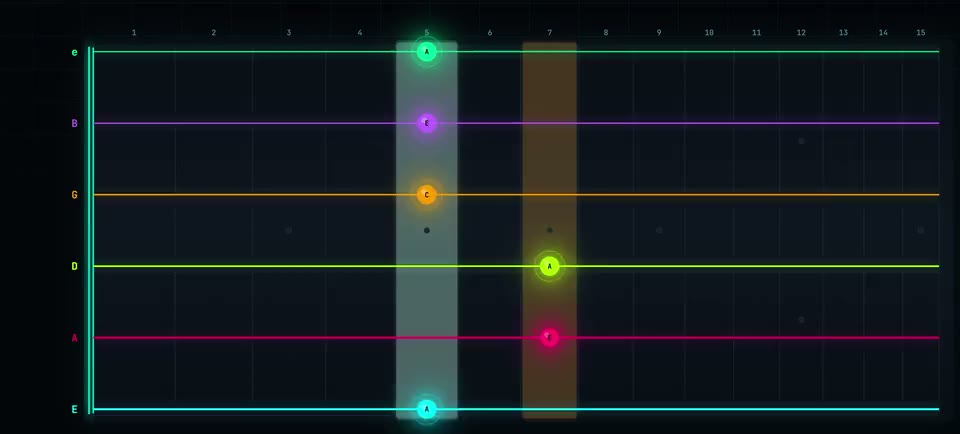
You have a .gp file and no Guitar Pro license. Drop it here instead: this free online Guitar Pro reader and viewer opens .gp, .gpx, .gp3 to .gp7 and MusicXML, plays the whole band, and lights every note on a fretboard using the exact string and fret the tab author wrote.
Slides, bends, hammer-ons and palm mutes play through a native tab synthesizer. A per-track mixer lets you mute the band and hear just your part, slow it down, and loop the bars you are working on.
Open a tab right now
Drop a .gp, .gpx or .gp3 through .gp7 file, MusicXML, or a MIDI file. Demo songs play without an account; loading a file of your own takes a free one.
Or drag it anywhere onto this box. It plays in your browser and is saved to your own private library.
Can you play Guitar Pro files without Guitar Pro?
Yes. Neural-Fretboard is a free Guitar Pro player that runs in your browser: drop a .gp, .gpx or .gp3 to .gp7 file (MusicXML and MIDI work too) and it plays the full score through a native tab synthesizer, including slides, bends, hammer-ons, palm mutes, dynamics and tempo changes. While the band plays, every note of your chosen track lights up on a fretboard at the exact string and fret the tab author wrote. You can loop a passage, mute or balance any track in the mixer, and set the speed anywhere from 25 to 200 percent without changing pitch, all for free. Creator adds the deep slow-down below 25 percent, down to 5, and Practice Mode, which listens through your microphone and waits until you play the right note. Demo songs need no account; loading your own files takes a free account. Nothing to install.
Desktop Guitar Pro vs this player
Guitar Pro the desktop app is excellent at what it does. If you are looking for a free Guitar Pro alternative to open, read and play tabs, this is one; if you need to write or edit them, it is not. The honest difference is what each is for.
| Guitar Pro (desktop) | Neural-Fretboard (browser) | |
|---|---|---|
| Price | Paid license | Free to play tabs; optional Creator plan for practice and video features |
| Install | Desktop download per machine | Runs in the browser, nothing to install |
| Opens tabs | All Guitar Pro formats | .gp, .gpx, .gp3 to .gp7, MusicXML, MIDI |
| Editing | Full professional tab editor | No tab editing - it performs the file you bring |
| Fretboard | Notation first, fretboard panel | The neck is the main view: portrait or landscape |
| Mic practice | Play along by ear | Practice Mode waits until your mic hears the right note. Part of Creator |
| Video export | None | A photoreal 3D guitar performs the tab and exports 9:16 or 16:9 video |
From file to playing along
Drop the file
Any Guitar Pro or MusicXML file. A track picker shows every part in the score with note counts.
Pick your track
The chosen track lights up on the neck while the rest of the band keeps playing. Mute or balance any track.
Practice it
Set a loop over the hard bar and take the speed down to 25 percent. With Creator you can go slower still, to 5 percent, and turn on Practice Mode, where the song waits until your microphone hears you play the right note.
What the tab synthesizer actually plays
A Guitar Pro file is a band score, not a single guitar part, and the player treats it that way. The whole score loads: drums, bass, keys and every guitar part play together through a native tab synthesizer, the same class of engine desktop tab software uses. Techniques render as written. Slides and bends move the pitch continuously instead of jumping between notes, hammer-ons and pull-offs play legato, palm mutes and dead notes damp the string, and dynamics markings change how hard each note is hit.
A per-track mixer sits above the fretboard: mute the guitar to play its part yourself over the band, or mute everything else to hear your part alone. You can also swap the sound of the featured track from the original tab synth to sampled instruments, from acoustic and clean electric to rock and metal tones with a built-in distortion amp, plus softer banks like nylon, harp and piano.
The fretboard follows the tab author
Most players show you notation. This one shows you the neck. In RAW mode the fretboard lights the exact string and fret the tab author wrote, which matters because fingering is half the information in a tab: the same pitch on a different string is a different hand position. Capos are drawn as a glowing bar at the right fret with capo-relative numbers, exactly like the printed tab, and non-standard tunings such as Drop D or Eb standard travel through, so a Drop D riff sits on the low string where it belongs.
Two views cover different ways of reading: portrait for a phone-style vertical neck, and landscape for the classic left-to-right layout. Both run from the same playback clock, so switching views never loses your place in the song. The 3D instrument is its own page, one click away.
Built for practicing, not just playback
Tempo scales without changing pitch, so a solo you cannot touch at full speed becomes learnable at 60%. The free range is 25% to 200%, which covers most of what practising asks for; Creator opens the range further down, to 5%, for the passage you have to take one note at a time. Loop markers repeat the bars you are working on, and an optional practice ramp raises the loop tempo by 5% each pass until you are back at full speed without noticing.
Practice Mode goes one step further: it listens through your microphone and freezes the song on the current note until your real guitar plays it. Single notes and full chords both count, a wrong note is named rather than just refused, and finished sessions feed streaks, stars and XP into your progress dashboard. No cable or interface needed, the built-in laptop mic works. It is part of Creator.
File support and the honest limits
Supported formats: .gp, .gpx, .gp3, .gp4, .gp5, .gp7, MusicXML (.musicxml, .mxl, .xml) and standard MIDI. A MIDI file has no fingering of its own, so the player works one out; MIDI to guitar tab explains how. Audio files like MP3 are deliberately not supported: working out the notes from a recording is a separate and much messier problem.
Playing tabs is free. The bundled demo songs work without any account; loading your own files takes a free account, which also stores 3 songs in your library so they follow you across devices. Unlimited library storage is part of the Creator plan. This is not a tab editor: you cannot modify the Guitar Pro file here. And when a riff is ready to show off, the same file can become a 3D guitar music video: a photoreal instrument performs it and exports straight to a vertical or landscape clip.
What you get, honestly
- Playing tabs is free. Demo songs work without an account; loading your own files takes a free account, which also saves 3 songs to your library.
- Two fretboard views: portrait and landscape. The 3D guitar is its own page.
- The speed control is free from 25 to 200 percent, along with the player, both views, looping and the tuner. Practice Mode and the slow-down below 25 percent are part of Creator.
- The same file can become a 3D guitar music video with one more click.